Showing posts with label Performance. Show all posts

Wednesday, November 6, 2024

Junit parallel execution Setup in pom.xml

 In maven based Java project, if your project has hundreds of Junit test cases it may take long time to run the application code build. To speed up build execution, it is recommended to setup your project to execute Junit Test in multi threaded parallel fashion. Below is sample code which you can put in your java module's pom.xml file:

<plugin>

<groupId>org.apache.maven.plugins</groupId>

<artifactId>maven-surefire-plugin</artifactId>

<configuration>

    <parallel>All</parallel>

    <forkCount>2C</forkCount>

    <reuseForks>true</reuseForks>

    <useSystemClassLoader>false</useSystemClassLoader>

</configuration>

</plugin>


Refer official documentation link for more details.

Thursday, July 7, 2016

Performance Tuning in AEM6


1. Tuning the Sling Job Queues
The bulk upload of large assets may be very resource intensive. By default the number of concurrent threads per job queue is equal to the number of CPU cores, which may cause an overall performance impact and high java heap consumption.  It is recommended to not exceed 50% of the cores. To change this value, go to : http://<host>:<port>/system/console/configMgr/org.apache.sling.event.jobs.QueueConfiguration and set queue.maxparallel to a value representing 50% of the CPU cores of the server hosting your AEM instance (eg. for 8 CPU cores, set the value to 4). 

2. Create custom oak indexes for all frequently used search queries.
a) Analyze slow queries
b) Create the custom indexes under the oak:index node for all search properties
c) For each custom Lucene-based index, try to set includedPaths
d) Make use of guessTotal when querying large data sets in the application code.
e) Cache the search results JSON using a selector-based URL approach

Following links may help-
Oak index generator utility: will generate an index definition from a search query

Granite query performance monitor:

Granite search index manager:

Search index config docs:

Another useful tool for search index developing and debugging:

3.  JVM parameters
Prevent expansive queries from overloading the systems:-
-Doak.queryLimitInMemory=500000 (see also the Oak documentation)
-Doak.queryLimitReads=100000 (see also the Oak documentation)
-Dupdate.limit=250000
-Doak.fastQuerySize=true

4. Lucene index configuration:
Open /system/console/configMgr/org.apache.jackrabbit.oak.plugins.index.lucene.LuceneIndexProviderService and
enable CopyOnRead
enable CopyOnWrite
enable Prefetch Index Files

5.  Externalize the Data Store
If you are using AEM Assets or have an AEM application that heavily uses binary files then it is recommended to use an external datastore. 

6. TAR off-line compaction only
As per Adobe on line compaction provides high-performing and healthy AEM environment but may cause rapid repository growth. Currently Adobe currently recommends to use the offline compaction, via the oak-run tool as documented under http://docs.adobe.com/docs/en/aem/6-0/deploy/upgrade/microkernels-in-aem-6-0.html#Maintaining the Repository

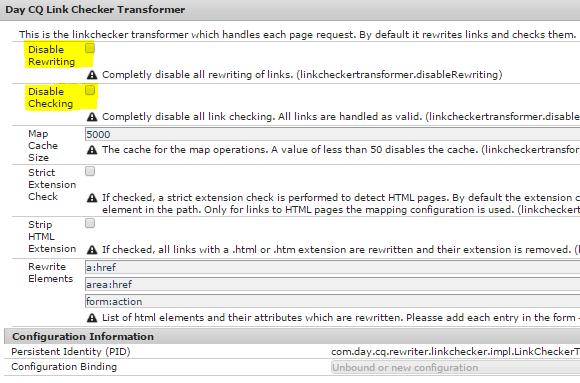
7. Disable Link Checker
If your project requirement does not need checking links on your pages then disable the link checker option from OSGi console-


Otherwise, follow the below link to figure out if it is causing any issue-

8. Settings for windows servers
If you are using windows server then look at the following link to figure out if any extra thing is required-
https://helpx.adobe.com/experience-manager/kb/high-memory-usage-aem-6.html

9. Avoid AEM crash during large asset upload
Follow the below link - https://helpx.adobe.com/experience-manager/kb/cqbufferedimagecache-consumes-heap-during-asset-uploads.html

10. IE Specific Tuning
If you support authoring in IE then following article may help you-
http://aem6solutions.blogspot.in/2016/06/aem6-image-upload-issue-in-internet.html


CDN | Clearing Cloudflare cache

In order to clear Cloudflare cache automatically via code, follow below steps: 1. Develop Custom TransportHandler Develop a custom Trans...